What images should an Amazon listing have? The 7-image set, slot by slot
A seven-image Amazon set, one job per slot, in the order shoppers swipe. What each image should show, what Amazon allows on it, and the mistakes that waste a slot.
Ashish · 5 min read
Open any Amazon listing on your phone and count how many images you actually look at before you decide.
For most people it's three or four. Swipe, swipe, swipe, then either "Add to cart" or back to the results.
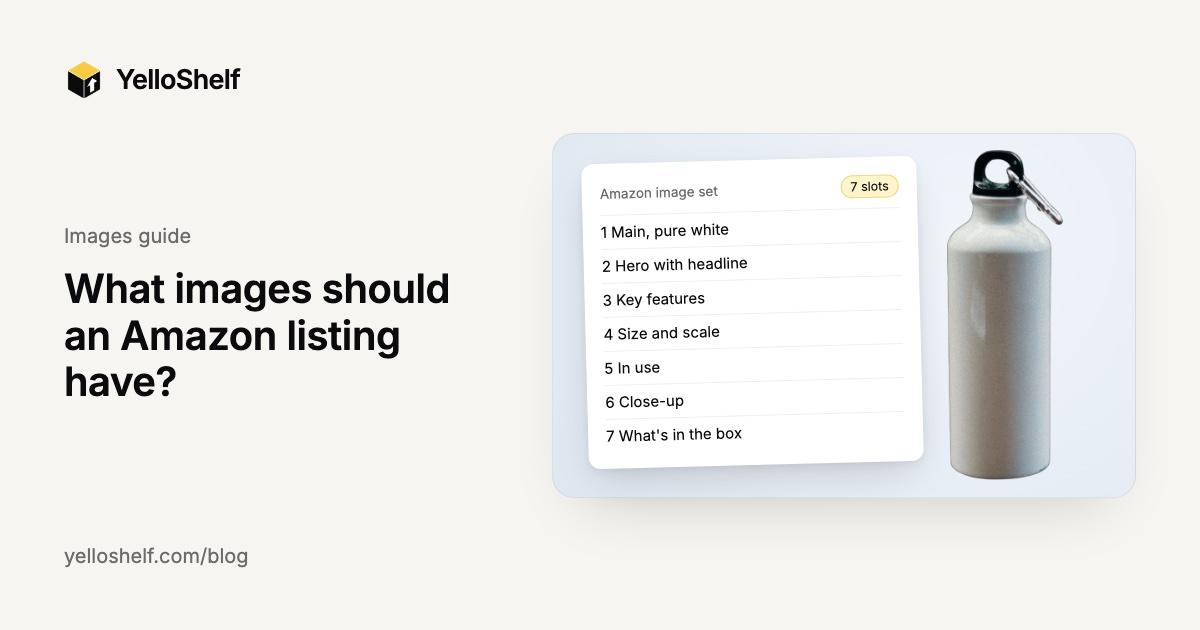
So you don't really have nine image slots. You have three or four that most people see, and a few more for the careful buyers. Every slot spent on the same product from a slightly different angle is a question you didn't answer. Here's a seven-image set, one job per slot, in the order shoppers swipe.
The rules that apply to every slot
From Amazon's product image guide, in short:
- Size. At least 500 pixels on the longest side, and 1,000 or more so zoom works.
- File. JPEG recommended, RGB colour.
- Accuracy. Every image shows the real product a buyer receives.
- Main image only: pure white background (255, 255, 255), the product filling about 85% of the frame, no text, no added graphics, no props that aren't included.
Amazon recommends at least six images beyond the main one, plus a video. Our Amazon listing images requirements has every rule in full.
Slot 1: the main image
Job: win the click in search results.
This is the only image most shoppers see before they choose. It has the strictest rules: pure white, the whole product in frame, filling about 85% of it, shown once.
Common mistake: the product too small in the frame. Next to competitors who fill their square, a product floating in white space looks cheaper and less clear. Check it at thumbnail size before you upload.
Slot 2: the hero
Job: sell the product in one glance.
This is the first image after the click. The product, large and well lit, with one short headline that says the main reason to buy. Not a list of features. One reason.
Example headline for a water bottle: "Cold for 24 hours. Fits your cup holder." Only if both are true.
Slot 3: key features
Job: show the three things that matter most.
The product in the middle, with two to four short callouts pointing at the features buyers compare. Icons help, since shoppers read them faster than words. Use the same wording as your bullet points so the images and text agree. See our Amazon infographic images guide for layouts.
Slot 4: size and scale
Job: answer "how big is it?"
Measurement lines, plus something familiar for scale: a hand, a phone, a coffee cup. "Smaller than expected" is a review nobody wants, and this one image is the cheapest way to prevent it.
Slot 5: in use
Job: help the buyer picture owning it.
The product being used for its main job, in a believable setting, by the kind of person who buys it. A blender making a smoothie in a normal kitchen. A bag on a shoulder. Keep the product the hero of the photo. If people appear, they should look real, and Amazon has rules on AI-generated people, covered in our requirements guide.
Slot 6: close-up and details
Job: prove the quality.
The stitching, the texture, the clasp, the label. Anything a buyer would pick up and look at closely in a shop. A short label helps: "Double stitched seams".
Slot 7: what's in the box
Job: stop the "does it come with...?" questions.
Every included item laid out and labelled. If the case or the charger isn't included, don't show it here. Buyers will assume it is.
Slots 8 and 9: earn them
If you have nine slots, use the last two for what your reviews ask about: a comparison of your own sizes or models, care instructions, or a how-to in three steps. If you don't have something useful, leave the slot empty rather than repeat an angle.
The set at a glance
| Slot | Image | Answers |
|---|---|---|
| 1 | Main, pure white | What is it? |
| 2 | Hero with one headline | Why this one? |
| 3 | Key features with callouts | What does it do best? |
| 4 | Size and scale | Will it fit? |
| 5 | In use | What's it like to own? |
| 6 | Close-up | Is it well made? |
| 7 | What's in the box | What do I get? |
Getting the set made
You have three options: shoot and design it yourself in a tool like Canva, hire a designer, or use a tool.
We built Listing images around this exact set. You add photos of your product (the front, the back and at least one more side) and answer a few questions a photo can't. We design three looks for your product and show each one on real slides. Pick the one that fits your brand, and you get six to nine slides:
- A pure white main image, ready for Amazon's rules.
- A hero with a headline.
- Your product in use, with real people and places only when they help sell.
- Benefits with icons and callouts.
- Close-ups.
- What's in the box.
Every slide is made from your own photos, so your product's shape, colours, logo and printed text stay exactly as they are. Headlines and callouts come from your product and your answers. We never invent sizes, ingredients or battery life. Drag over any part of a slide to change just that part, then download the set sized for Amazon and every other marketplace you sell on.
Still check every image against Amazon's rules before you upload. You know the product best.
Quick checklist
- Main image pure white, product filling the frame, no text.
- A hero with one clear reason to buy.
- Features, size, in use, details and what's in the box each get a slot.
- Callouts match your bullet points.
- Nothing shown that isn't included.
- Every image checked at phone size.
Credit packs start at $10, with no subscription and a money-back guarantee on your first purchase.
Made by the team behind YelloShelf
Get the whole Amazon image set from your photos
A white main image, a hero, benefits with callouts, close-ups and what's in the box, sized for Amazon. Your product, logo and printed text stay exactly as they are.
- Your first listing or review is free
- Pay as you go credit packs from $10
- No subscription
- 7-day money-back guarantee on your first purchase
FAQ
How many images should an Amazon listing have?
Amazon's image guide recommends at least six images in addition to the main image, plus a video. Most listings can show up to nine images on the product page, so a set of seven to nine covers the questions buyers ask.
Can Amazon listing images have text?
Not the main image. It must be the product on a pure white background, with no text, logos or graphics added. The other images can carry text, such as short callouts, as long as they follow Amazon's rules for every image.
What size should Amazon listing images be?
At least 500 pixels on the longest side to upload, and 1,000 pixels or more so zoom works. Many sellers use 2,000 by 2,000 pixel squares. JPEG is the recommended file type.
What is the best order for Amazon product images?
Lead with the main image, then the image that sells the product best at a glance, then the features, size, in use, details and what's in the box. Put the answers to the questions in your reviews early, since many shoppers stop swiping after a few images.