Instagram post ideas for product businesses (with real examples)
Stuck on what to post for your shop? Here are 15 Instagram post ideas that work for physical products, with an example for each, the sizes Instagram supports and a weekly plan that doesn't eat your whole weekend.
Ashish · 6 min read
You open Instagram to post something for your shop. You've already shared the product photo. Twice. You scroll for ideas, see a brand with a full-time content team, close the app and go back to packing orders.
Most small product businesses don't run out of products. They run out of angles. This guide gives you 15 post ideas that work for physical products, an example for each, and a simple plan so you're not starting from zero every time.
Before you post: the sizes Instagram supports
From Instagram's Help Center:
| What | Instagram's guidance |
|---|---|
| Photo width | Instagram keeps photos up to 1080 pixels wide. Upload at least 1080 pixels wide for the best quality |
| Shape | Aspect ratios between 1.91:1 (wide) and 3:4 (tall) keep their shape. Others get cropped |
| Tallest size at full quality | 1080 x 1440 pixels (3:4) |
| Carousels | Up to 20 photos and videos in one post, with one caption for the whole post |
| Carousel shape | The shape you pick applies to every photo in the post |
| Hashtags | Up to 5 per post |
Sources: image resolution, multiple photos in one post and hashtags.
Taller posts take up more of the screen in the feed, so 3:4 (1080 x 1440) is a sensible default for product photos.
15 Instagram post ideas for products
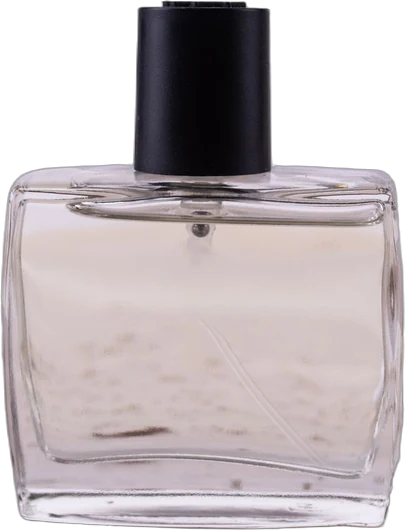
The examples below are made up. "Linden & Lark" isn't a real brand. Linden & Lark is a small perfume brand, used to show how each idea looks in practice.
Show the product
1. The hero shot. One clean, well-lit photo of a single product. The simplest post and still one of the most useful. Example: the 50 ml bottle on a stone tray, morning light, nothing else in frame.
2. The detail close-up. The part buyers can't see in a small thumbnail: texture, stitching, the clasp, the label. Example: the engraved cap, close enough to read the lettering.
3. Scale. The item in a hand, on a shelf or next to something everyone knows the size of. Example: the travel size next to a lip balm, so people stop asking how small it is.
4. Every option. All colours, sizes or scents in one photo, or one per slide. Example: four scents in a row, each with its main note written underneath.
Show it in use
5. In real life. The product where it actually lives. A real setting beats a perfect one. Our guide to lifestyle product photos covers how to shoot this at home. Example: the bottle on a messy dressing table among everyday things.
6. How to use it. A short step-by-step carousel or video. Example: where to spray, how many sprays, and why not to rub your wrists.
7. Before and after. Works for anything that changes something: cleaning, organising, styling, repairs. Example: a gift box before and after it's wrapped, if gift wrap is part of the order.
Show the people and process
8. Behind the scenes. Your workspace, a batch being made, the boring parts too. Example: 200 bottles being filled and labelled at the kitchen table.
9. Meet the maker. A photo of you with one line about why you started. Example: the founder holding the first bottle she ever made, with a short story in the caption.
10. Packing an order. People love watching orders get packed, and it shows buyers what they'll receive. Example: tissue, a handwritten note, the bottle in its box.
Answer questions
11. The FAQ post. Pick one question people keep asking and answer it in a photo or a short carousel. Example: "How long does it last on skin?" with a plain, honest answer.
12. This or that. Two options side by side. Easy to reply to, and it tells you what people prefer. Example: "Fig or vetiver for autumn?"
13. What's in it. Materials, ingredients or what's in the box, laid out flat. Example: the top, middle and base notes shown as the actual raw materials.
Show proof
14. A real review. Screenshot or quote a real customer review, with permission. Never invent one. Example: a review quoted word for word next to the scent it's about.
15. Customer photos. Share photos customers have posted, with their permission and credit. Example: a customer's photo of the bottle on their bathroom shelf, credited to their account.
A simple weekly plan
You don't need to post every day. Three posts a week you can actually keep up beats seven for one week and then nothing.
| Day | Post type | Ideas to rotate |
|---|---|---|
| Monday | Product | 1, 2, 3, 4 |
| Wednesday | In use or people | 5, 6, 8, 9, 10 |
| Friday | Questions or proof | 11, 12, 13, 14, 15 |
Shoot several posts in one session, so one afternoon covers a few weeks. When a post does well, make another version of it with a different product.
Make each post easier to act on
- Lead with the picture. Most people decide in the first second whether to stop.
- Use carousels for anything with steps or options. Our guide to Instagram carousels for products has a 5-slide formula.
- Write captions that sound like you. See Instagram captions for products for examples that don't sound like an ad.
- Tell people where to buy. Mention the link in your bio, or tag the product if your account is set up for Instagram Shopping.
- Keep the product accurate. Colours and details in your posts should match what people receive, the same as on your listings.
Where YelloShelf fits
Everything above works with a phone and a free afternoon. If you'd rather not plan and shoot every post yourself, YelloShelf designs three post ideas for a product from your own photos, then makes a carousel in the one you pick, with captions and hashtags for Instagram, TikTok, Pinterest, Facebook and X. Your real product is on every slide, and you download the post and publish it yourself. It doesn't have a free plan or trial. You buy a credit pack, starting at $10, and your first purchase comes with a money-back guarantee. We're helping you remove the manual, tedious, time-consuming work. You still read it, edit it and paste it in yourself.
Quick checklist
- Photos at least 1080 pixels wide.
- Shape between 1.91:1 and 3:4. 1080 x 1440 is a good default.
- Same shape for every photo in a carousel.
- No more than 5 hashtags.
- A mix of product, in use, people, questions and proof.
- Real reviews and customer photos only, with permission.
- A clear next step: link in bio or a product tag.
FAQ
What should a small business post on Instagram?
Mix five kinds of posts: the product itself, the product in use, the people and process behind it, answers to common questions, and proof such as real reviews. Rotating through them keeps your feed varied without new ideas every day.
How often should a product business post on Instagram?
Post as often as you can keep up. For many small shops, two or three good posts a week is realistic. Shoot several in one session so you're not starting from scratch each time.
What size should Instagram product photos be?
Upload at least 1080 pixels wide, with an aspect ratio between 1.91:1 and 3:4. A tall 3:4 photo at 1080 x 1440 pixels keeps full quality and fills more of the screen.
How many photos can I put in an Instagram carousel?
Up to 20 photos and videos in one post. They all share one caption, and the shape you choose applies to every photo in the post.
How many hashtags should I use on Instagram?
Instagram's Help Center says you can use up to 5 hashtags on a post. Pick a few specific ones that describe the product, rather than broad, busy tags.
Made by the team behind YelloShelf
Rather not redo all of this for every product?
Upload your product photos and YelloShelf writes the title, description, bullet points, tags and a suggested price for each platform you sell on, from real market research. You check it, edit it and paste it in.
Try YelloShelf